Touch screens in the latest diesel generators help you monitor key engine performance matrices and give you full control. You can track down the faults and resolve them before they destroy generator components. But sometimes you notice a black and frozen interface or display weird alarms in the Diesel Generator Touch Screen Fault Handling. However, today we will explore the diesel generator touch screen fault handling and learn the causes.
Nutshell: How does Diesel Generator Touch Screen Fault Handling Work?
If you are dealing with regular fault detection with a diesel generator touch screen, then you need to perform these steps:
- Firstly, manage the generator battery voltage. Fix different fuses and ensure reliable grounding for safe operation.
- Make sure to keep your heavy equipments save during touch screen malfunctions by engaging emergency stops.
- Sometimes restarting the diesel generator or power supply might fix issues with the Diesel Generator Touch Screen Fault Handling.
- If you still struggle to find the cause, tighten all the wires and provide smooth communication between connections.
- Check for diesel alarm codes if the display is available on the touch screen and fix them before restarting the generators.
- In case of complete hardware failure of the touch screen, you need to replace the module with a new one.
What are Diesel Generator Touch Screen Faults?
A touch screen control panel in a diesel generator lets you control the engine operation and look for potential threats. When generators deal with a rise in temperature, leaks, or oil pressure failure screen displays the fault codes. Meanwhile, after finding the fault codes, you can pinpoint the cause of the problem and fix it immediately. However, different main types of faults end up damaging the Diesel Generator Touch Screen Fault Handling:
- Power-related issues
- Communication failures
- Internal module or hardware faults
Before you jump to fixing the issues, you’d better learn the type of touchscreen fault for an effective solution. This way, you can save time and prevent unnecessary component replacement.
Initial Faulty Touch Screen Inspection and Power Checks
Normally, you deal with touch screen faults due to common power issues and fluctuations. That’s why you should try basic checking before jumping on complex solutions:
- Make sure the DC power supply ranges from 12 to 24V for a smooth voltage.
- Clean the battery terminals, tighten and charge them fully.
- Blown fuses can also disrupt the touch screen’s function, so replace them.
- Confirm proper grounding for safe and clean operation and prevent unwanted flickering or faults.
Causes and Solutions: Diesel Generator Touch Screen Fault Handling
There is a certain symptom that represents a different type of failure cause in the touch screen of a diesel generator, such as:
Frozen or Unresponsive Screen
You can notice frozen screen panels due to some temporary software glitches. However, go for a hard generator reset by unplugging the battery, waiting for a few minutes and then connecting it back. You can refresh and clear minor faults with this method.
Blank or No Display
A full black screen might be because of a problem in wirings. Meanwhile, open up the panel and reconnect loose wires to start the touch screens. If tightening the wires does not solve the issue, then replace the module.
Alarms That Won’t Reset
Sometimes, after you fix the potential faults, the alarms continue buzzing. In that case, perform these three things:
- Control panel reset
- If this is not helping, do an entire system restart.
- Also, restoring default configuration settings can fix annoying alarms.
Out-of-Sync or System Errors
Usually, the generator after fuel depletion skips the synchronization with the main power supply. You can fix this touchscreen by:
- Refilling the fuel supply
- Try resetting the control panel
- Or check the synchronization option in the settings.
Manage Error Codes on the Control Panel
You can avoid taking wrong actions by learning about the fault code displayed on touch screens:
- When you see high temperature or low oil pressure indicators on the touch screen shutdown generator first. Secondly, you need to make sure that proper coolant and oil levels are maintained. Avoid starting the engine immediately to protect components.
- You can monitor fuel supply blackouts by tracking the low or high readings on MPU speed sensors.
- Touch screen helps you maintain consistent voltage through an automatic voltage regulator (AVR). However, it prevents voltage overloading and ensures stable operation.
Advanced Troubleshooting for Persistent Issues
You need effective diesel generator touch screen fault handling to recognize high risks, that’s why look for:
Communication Errors
If the touch screen shows a new error like “Communication Error,” then you should check the CAN bus wires because the Controller Area Network is responsible for a smooth connection between the control panel and the engine ECU. Additionally, you can see this fault code on screens because of loose cables, unstable connections or voltage fluctuations.
Diagnostic Tools
Nowadays, most generators come with highly advanced settings, so you might need certain tools to track fault codes. You can easily analyze complex generator structure, learn about minor issues and resolve them before bigger damage. Also, this special equipment finds hidden faults and helps you in diesel generator touch screen fault handling.
Controller or Module Failure
If your control panel does not work even after confirming proper power or fuels then the generator module is problematic. In such a situation, you have to make a big decision and replace the module to avoid future component disruption.
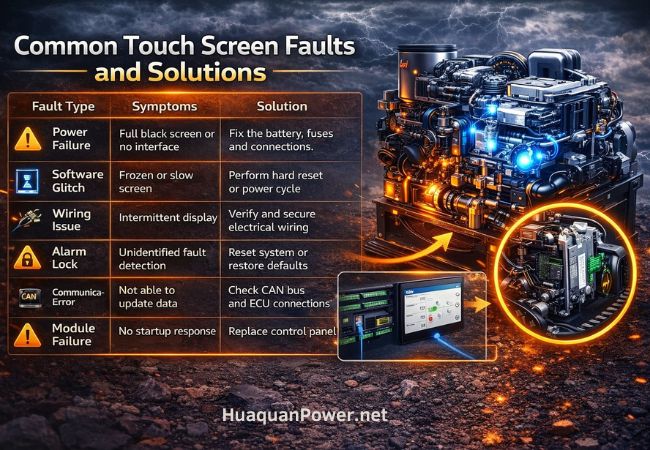
Diesel Generator Touch Screen Fault Handling Overview
| Fault Type | Symptoms | Solution |
| Power Failure | Full black screen or no interface | Fix the battery, fuses and connections. |
| Software Glitch | Frozen or slow screen | Perform a hard reset or power cycle |
| Wiring Issue | Intermittent display | Verify and secure electrical wiring |
| Alarm Lock | Unidentified fault detection | Reset system or restore defaults |
| Communication Error | Not able to update data | Check CAN bus and ECU connections |
| Module Failure | No startup response | Replace the control panel |
Preventive Maintenance for Touch Screen Panels
You can reduce the risk of screen failure by following these preventive tips:
- You need to regularly check for loose wires, connections, and ensure proper grounding.
- To avoid potential failures in the touch screen, carefully clean all the dust and moisture.
- Before applying all the load on the generator, first test slowly by increasing the load and checking the system operation.
- You can also update the controller software if needed.
- Make sure the generators run on a stable battery voltage and avoid fluctuations.
Safety Precautions During Troubleshooting
You need to follow the right safety measures while Diesel Generator Touch Screen Fault Handling. Before touching any wires or connections, remove the negative terminal of the batteries. It’s important to avoid sudden electrical shock and provide security to your expensive equipment.
Do not restart the generator until you fix the critical alarms of fault codes. Menwhile high risk alerts include high pressure or a rise in temperature, and overheating can damage the components.
Conclusion:
To perform reliable diesel generator touch screen fault handling, follow the systematic approach. First of all, confirm the stable power supply, tighten all the wires and try resetting the system settings to default. If nothing works in your favour, then you can replace the module entirely.
Visit Huaquan Power for highly efficient and advanced diesel generators.
FAQs
How do you fix a Diesel Generator Touch Screen Fault Handling that is not responding?
To effectively deal with a diesel generator touch screen fault handling start by checking the smooth battery voltage. Fix all the blown-up fuses and maintain reliable grounding. In case nothing works out, you can do a hard reset by disconnecting all the power sources. Meanwhile, make sure all the wires and connections are working smoothly and replace the control module.
Why is my generator control panel screen blank or dead?
The reason behind a blank or dead control panel interface can be either power loss, broken fuses, or loose connections. Sometimes the control panel is going through failures that can also cause touch screen failure.
What causes communication errors on a generator touch screen?
You notice multiple communication errors popping up in the controller touchscreen due to:
- Faulty CAN bus wiring
- Loose connections
- Poor grounding
- Different Controller issues